Chat Bot Command Hooks
Hooks to add to chat bots to integrate with the website
Next Reveal

StreamElements
Add with the command below or with this link this link!command add !next-reveal $(urlfetch https://www.hsguru.com/chat-bot-command-hook/$(channel)/next-reveal)
NightBot
!addcom !next-reveal $(urlfetch https://www.hsguru.com/chat-bot-command-hook/$(channel)/next-reveal)
Deckcode
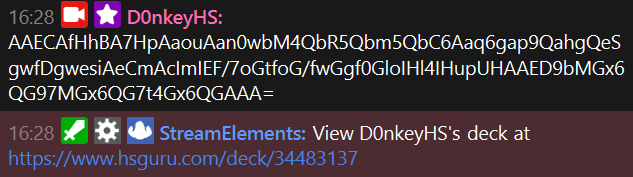
StreamElements
Add using this link
The name is gibberish because it's not meant to be used. The advanced settings handle the intended use case of somebody posting just a deckcode.
NightBot
AFAIK it's not possible to do this with NightBotLeaderboard
Search the ladder for specified battletagsStreamElements
!command add !ldb $(urlfetch https://www.hsguru.com/chat-bot-command-hook/$(channel)/leaderboard?options=$(1:))
Example uses:
  !ldb D0nkey reqvam
  !ldb D0nkey r:EU l:STD
Region and leaderboard/mode can be filtered with r: or l:, see below for options what to put after
Top 25
Top 25 of a leaderboardStreamElements
!command add !top25 $(urlfetch https://www.hsguru.com/chat-bot-command-hook/$(channel)/leaderboard-top25?options=$(0:)&default_region=EU&default_leaderboard_id=STD)
Example uses:
  !top25
  !top25 am wLd
  !top25 asia
Change STD or EU if you want to change the default mode or region
- BG
- DUO
- STD
- WLD
- CLS
- MRC
- arena
- twist
- undergroundarena
- AM
- AP
- CN
- EU
Leaderboard count
How many people are on the leaderboards in each region for a modeStreamElements
!command add !ldbc $(urlfetch https://www.hsguru.com/chat-bot-command-hook/$(channel)/leaderboard-count?leaderboard_id=$(0:)&default_leaderboard_id=STD)
Example uses:
  !ldbc
  !ldbc wld
  !ldbc WLD
  !ldbc wild
Change STD if you want to change the default mode, see above for options
HS News
StreamElements
!command add !hsnews $(urlfetch https://www.hsguru.com/chat-bot-command-hook/$(channel)/hearthstone-news?options=$(0:))